Page 1 of 3
LofSlider and LofSliderNews - both new since 1.4.7 r410
Posted: Thu 30. Dec 2010, 21:33
by Jensensen
new and included since r410:
http://code.google.com/p/phpwcms/source/detail?r=410
LofSlider can be used in two ways:
1) CP Images <special>
2) News
I tried but failed. Unfortunately it doesn't work out of the box, isn't it?
Does anybody know how to use it?
Re: LofSlider and LofSliderNews - both new since 1.4.7 r410
Posted: Fri 31. Dec 2010, 05:55
by Oliver Georgi
It works out of box but you have to adopt it to your own CSS to get it working (looking) as expected. And it works with jQuery only.
I have tested it with Images <special> only. But based on this work it should run with teaser or other content too. But yes, it is very special and tricky — hehe it comes from the Joomla side of life.
If someone needs help, remember you can hire me.
I have developed it for a customer and while doing this some additional things were needed in phpwcms. The customer allowed me to pack it with phpwcms by default.
Here are some config details, but not well documented:
http://landofcoder.com/our-porfolios/jq ... lugin.html
Re: LofSlider and LofSliderNews - both new since 1.4.7 r410
Posted: Fri 31. Dec 2010, 07:45
by juergen
hmmm.. runs out of the box. Not so pretty on my testing site, but as expected. Nice Effect.
Re: LofSlider and LofSliderNews - both new since 1.4.7 r410
Posted: Fri 31. Dec 2010, 07:55
by Oliver Georgi
Prettiness is in your hand.
Re: LofSlider and LofSliderNews - both new since 1.4.7 r410
Posted: Sat 1. Jan 2011, 17:11
by update
Re: LofSlider and LofSliderNews - both new since 1.4.7 r410
Posted: Tue 4. Jan 2011, 16:47
by pepe
Hupdidupdeee...... I have got it running for the
ContenParts "Image special" and "NEWS" now

Ok, many hours of trying ("The same procedure as
every revision... James!") ... but it's workin like a charme now.
Great solution!
Thanks Oliver
Re: LofSlider and LofSliderNews - both new since 1.4.7 r410
Posted: Wed 5. Jan 2011, 15:48
by baklavoni
I can confirm that it is working for upgraded r406 -> r412

I tested it with image special CP.
Great solution!
Oliver, many thanks!!!
Re: LofSlider and LofSliderNews - both new since 1.4.7 r410
Posted: Mon 10. Jan 2011, 18:35
by baklavoni
pepe wrote:Hupdidupdeee...... I have got it running for the
ContenParts "Image special" and "NEWS" now
Ok, many hours of trying ("The same procedure as
every revision... James!") ... but it's workin like a charme now.
Great solution!
Thanks Oliver
Hi Pepe!
would you be kind and share your template for News CP?

Thanks in advance...
Re: LofSlider and LofSliderNews - both new since 1.4.7 r410
Posted: Mon 10. Jan 2011, 20:30
by pepe
baklavoni wrote:Hi Pepe!
would you be kind and share your template for News CP?
Thanks in advance...
OK... i will, but give me a few days
Re: LofSlider and LofSliderNews - both new since 1.4.7 r410
Posted: Mon 17. Jan 2011, 08:47
by baklavoni
pepe wrote:
OK... i will, but give me a few days
Hi Pepe,
did you managed to get some time...?
Re: LofSlider and LofSliderNews - both new since 1.4.7 r410
Posted: Mon 17. Jan 2011, 09:08
by juergen
Yes, we are all waiting ! Whats up Pepe ? No comment, no nothing, same procedure as these you complain about !

Re: LofSlider and LofSliderNews - both new since 1.4.7 r410
Posted: Mon 17. Jan 2011, 10:19
by pepe
You must know:
There is an other life beside phpwcms...
Re: LofSlider and LofSliderNews - both new since 1.4.7 r410
Posted: Mon 17. Jan 2011, 11:16
by pepe
Also gut, hier ist meine Sandbox-Version für den Bereich
NEWS... ohne viel Kommentare.
Einfach mal versuchen
OK, here is my Sandbox-Version of the LofSliderNews for the NEWS section of phpwcms...
Give it a try
.../template/inc_cntpart/news/pepes-NEWS_Lof-JSliderNews-Right.tmpl
Code: Select all
====================================================================
pepes Experimentier-Version / pepes Sandbox-Version
Diese Datei abspeichern als / Save this file as:
.../template/inc_cntpart/news/pepes-NEWS_Lof-JSliderNews-Right.tmpl
====================================================================
<!--NEWS_SETTINGS_START//-->
; how many news should be listed per row
news_per_row = 1
; teaser text rendered as <p></p> = p
; or just line break to <br> = br
news_teaser_text = p
; cut teaser text | 0 means no limit
news_teaser_limit_chars = 0
news_teaser_limit_words = 50
news_teaser_limit_ellipse = …
; template for files - the same as used forContentPart "file"
; default: files_template_list = default
files_template_list = default
files_template_detail = default
files_direct_download = 0
<!--NEWS_SETTINGS_END//-->
<!--NEWS_LIST_START//-->
<!-- START :: NEWS Liste :: pepes-NEWS_news.tmpl ========== ========== -->
<div class="pepes_NewsList">
[TITLE]
<h3>{TITLE}</h3>[/TITLE][SUBTITLE]
<h4>{SUBTITLE}</h4>
[/SUBTITLE]
<div class="lof-slidecontent lof-snleft">
<div class="lof-main-outer">
<ul class="lof-main-wapper">
[NEWS_ENTRIES]{NEWS_ENTRIES}[/NEWS_ENTRIES]
</ul><!-- STOP lof-main-wrapper -->
</div><!-- STOP lof-main-outer -->
</div><!-- STOP lof-slidecontent lof-snleft -->
</div><!-- /pepes_NewsList -->
<!-- STOP:: pepes-NEWS_Lof-JSliderNews-Right.tmpl ========== ========== ========== -->
<!-- CSS: {TEMPLATE}lib/lofslider/css/lofslider-style.css -->
<!-- CSS: /* Hide the nav item element by default - we use JS to move it at right place */
.lof-nav-item { display:none; }
/* Breite der Haupt-Elemente soeben geladenen CSS-Datei hier ueberschreiben */
.lof-slidecontent { width:960px; }
.lof-main-outer { width:668px; }
ul.lof-main-wapper { width:668px; }
ul.lof-main-wapper li { width:668px; }
ul.lof-main-wapper li img { width:668px; }
.lof-main-item-desc { top:50%; left:0px; width:648px; padding-bottom:5px; }
-->
<!-- JS: dimensions.min -->
<!-- JS: easing.min -->
<!-- JS: mousewheel.min -->
<!-- JS: {TEMPLATE}lib/lofslider/lofslider.js -->
<!-- JS: /* build LofJSlider navigational element */
jQuery(document).ready(function(){
var lof_options = {
mainWidth : 668, // Breite der Sliderbewegung, muss zu CSS-Daten (weiter oben) passen!
maxItemDisplay : 3, // Navigations-Elemente anzeigen
startItem : 0, // Anzeige bei Seitenaufruf von Element 0,1,2,3...
navigatorHeight : 100, //
navigatorWidth : 310, //
interval : 5000, // Standzeit pro Bild in ms
duration : 1200, // Uerblenddauer in ms
easing : 'easeInOutSine',
auto : true // true = Autostart des Sliders
};
// iterate all nav items "div.lof-nav-item
$('ul.lof-main-wapper').each(function(){
// append lof navigator wrapper and lof navigator element
var nav_wrapper = $('<div class="lof-navigator-outer"><'+'/div>').insertAfter( $(this).parent() );
var nav = $('<ul class="lof-navigator"><'+'/ul>').appendTo( nav_wrapper );
// now iterate all and remove it from DOM the same step
var navitems = $(this).find('li div.lof-nav-item').detach();
navitems.each(function(){
// append it to navigator element
$('<li><div>' + $(this).html() + '<'+'/div><'+'/li>').appendTo(nav);
});
$(this).parent().parent().lofJSidernews(lof_options);
});
});
-->
<!--NEWS_LIST_END//-->
<!--NEWS_LIST_ENTRY_START//-->
<div class="newsEntry[PRIO] prio{PRIO}[/PRIO]" style="padding:0px;">
<li>
<!-- Ausgabe des Bildes mit der IMAGE_ID: {IMAGE_ID} -->
<!-- Hauptelement = grosses Bild - linke Seite -->
<img src="img/cmsimage.php/668x300x1/{IMAGE_ID}" title="{CAPTION}" alt="{CAPTION}" />
<div class="lof-main-item-desc">
[NEWS_TITLE]<h3>{NEWS_TITLE}</h3>[/NEWS_TITLE]
[NEWS_SUBTITLE]<h4>{NEWS_SUBTITLE}</h4>[/NEWS_SUBTITLE]
[NEWS_TEASER]<div class="news_teaser">{NEWS_TEASER}</div>[/NEWS_TEASER]
[URL]<!-- Es ist der folgende Link fuer Zusatzinformationen vorhanden -->
<p class="link news_read-more"><a href="{URL}"{URL_TARGET}>[URL_TEXT]{URL_TEXT}[/URL_TEXT][URL_TEXT_ELSE]zusätzliche Informationen[/URL_TEXT_ELSE] »»»</a></p>
[/URL]
</div>
<!-- Navigationselement = kleines Bild - rechte Seite -->
<div class="lof-nav-item">
<img src="img/cmsimage.php/60x60x1/{IMAGE_ID}" alt="" />
[NEWS_TITLE]<h3 style="margin-bottom:3px;">{NEWS_TITLE}</h3>[/NEWS_TITLE]
[NEWS_SUBTITLE]<h4 style="color:#fff;">{NEWS_SUBTITLE}</h4>[/NEWS_SUBTITLE]
<!-- [NEWS_TEASER]{NEWS_TEASER}[/NEWS_TEASER] -->
[NEWS_TOPIC]<p class="news_list_topic" style="text-align:left; color:#333; font-size:8px; margin:0 0 5px;">Verfasst: {LIVEDATE:d.m.Y lang=DE}[AUTHOR]<br />Autor: {AUTHOR}[PLACE] - {PLACE}[/PLACE][/AUTHOR][AUTHOR_ELSE][PLACE] - {PLACE}[/PLACE][/AUTHOR_ELSE]</p>[/NEWS_TOPIC]
</div>
</li>
</div><!-- STOP /newsEntry[PRIO] prio{PRIO}[/PRIO] -->
<!--NEWS_LIST_ENTRY_END//-->
<!--NEWS_LIST_ENTRY_SPACE_START//-->
<!-- Horizontaler Trenner zwischen zwei Elementen der selben Zeile -->
<!--NEWS_LIST_ENTRY_SPACE_END//-->
<!--NEWS_LIST_ROW_SPACE_START//-->
<!-- Vertikaler Trenner zwischen einzelnen Zeilen -->
<!--NEWS_LIST_ROW_SPACE_END//-->
<!--NEWS_DETAIL_START//-->
<!-- START :: NEWS Detail :: pepes_news.tmpl ========== ========== -->
<div class="pepes_NewsDetail" style="min-height:272px; margin:20px 10px 10px 230px;">
<!-- Ausgabe des Bildes mit der IMAGE_ID: {IMAGE_ID} -->
[NEWS_TITLE]<h3 style="letter-spacing:0.1em;">{NEWS_TITLE}</h3>[/NEWS_TITLE]
[NEWS_SUBTITLE]<h4>{NEWS_SUBTITLE}</h4>[/NEWS_SUBTITLE]
[NEWS_TOPIC]<p class="news_topic" style="color:#999;"><!--<strong>-->Erstellung: {LIVEDATE:d.m.Y lang=DE}[AUTHOR] / Autor: {AUTHOR}[PLACE] - {PLACE}[/PLACE][/AUTHOR][AUTHOR_ELSE][PLACE] - {PLACE}[/PLACE][/AUTHOR_ELSE]<!--</strong>--><!-- (Revision: {DATE:d.m.Y-H:i lang=DE})--></p>[/NEWS_TOPIC]
[IMAGE]
[ZOOM_ELSE]
[IMAGE_URL]<a href="{IMAGE_URL}"{IMAGE_URL_TARGET}>[/IMAGE_URL]
<div class="newsImageTeaser"><img src="img/cmsimage.php/150x150/{IMAGE_ID}" alt="{CAPTION}" border="0" /></div>[IMAGE_URL]</a>[/IMAGE_URL]
[/ZOOM_ELSE]
[ZOOM]
<a href="img/cmsimage.php/800x800/{IMAGE_ID}" target="_blank"{LIGHTBOX}[LIGHTBOX_CAPTION] title="{LIGHTBOX_CAPTION}"[/LIGHTBOX_CAPTION]>
<div class="newsImageTeaser"><img src="img/cmsimage.php/150x150/{IMAGE_ID}" alt="{CAPTION}" border="0" /></div></a>
[/ZOOM]
[/IMAGE]
[NEWS_TEXT]<div class="news_text">{NEWS_TEXT}
</div>[/NEWS_TEXT]
[NEWS_TEXT_ELSE][NEWS_TEASER]{NEWS_TEASER}[/NEWS_TEASER][/NEWS_TEXT_ELSE]
[URL]
<p><br /><strong><a href="{URL}"{URL_TARGET}>[URL_TEXT]{URL_TEXT}[/URL_TEXT][URL_TEXT_ELSE]Hier finden Sie Zusatzinfos[/URL_TEXT_ELSE]</a></strong></p>
[/URL]
[FILES]<div style="clear:both;"></div>
{FILES}[/FILES]
[NEWS_LIST_LINK]
<p class="link news_back">««« <a href="{NEWS_LIST_LINK}">zur aktuellen News-Übersicht</a></p>
[/NEWS_LIST_LINK]
<div style="clear:both;"></div>
</div><!-- /pepes_NewsDetail -->
<!-- STOP :: NEWS Detail :: pepes_news.tmpl ========== ========== -->
<!--NEWS_DETAIL_END//-->
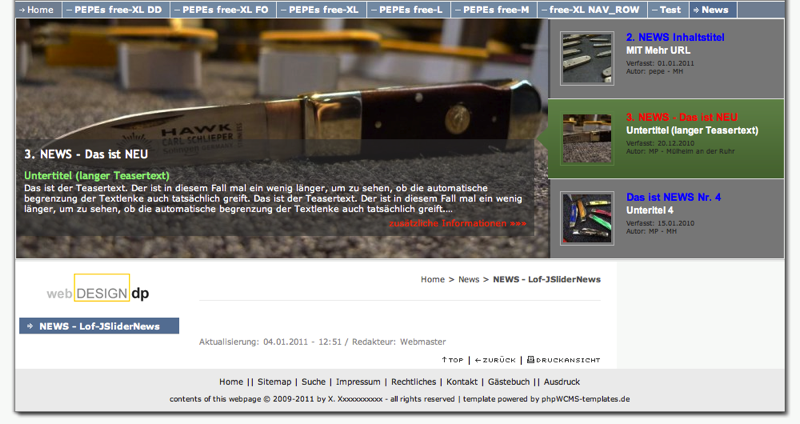
Und so siehts bei mir aus:
Re: LofSlider and LofSliderNews - both new since 1.4.7 r410
Posted: Tue 18. Jan 2011, 09:10
by baklavoni
Pepe,
many thanks!
It is working like a charm
pepe wrote:You must know:
There is an other live beside phpwcms...
For me, life without phpWCMS is no life
Re: LofSlider and LofSliderNews - both new since 1.4.7 r410
Posted: Tue 18. Jan 2011, 14:30
by juergen
Thanks baklavoni for working this "no life without phpwcms" out, I agree 101 % !!!