Page 2 of 2
Re: NAV_TABLE_COLUMN submenu align
Posted: Tue 11. Nov 2008, 12:23
by flip-flop
Code: Select all
#my_NAVI ul li a {
.
.
padding-left:15px;

/* ++ Killing the "white-space" bug in IE7 */
\width: 180px;  /* IE5x Opera <= 5 */
widt\h: 165px;  /* = (Width of Menu Items) - (padding-right + padding-left) */
.
.
}
In addition, I think your classes are in a wrong order:
Better:
- #my_NAVI
#my_NAVI ul, #my_NAVI li
#my_NAVI ul li a
#my_NAVI ul li.active a,
#my_NAVI ul li.active a:link,
#my_NAVI ul li.active a:visited,
#my_NAVI ul li.active a:active
#my_NAVI ul li a:hover
Knut
Re: NAV_TABLE_COLUMN submenu align
Posted: Tue 11. Nov 2008, 16:17
by blanders
It's a miracle - it's working!
Last question re this topic - My coal is to use separate image file only for the menu link which is currently in active state.
I got it so far, that it shows different image file for the active link + all the submenu links.
How to get it working so, that ONLY active link has different image not its sub links
"ul li.active" does'nt do the trick for me. It's easy, right?
Re: NAV_TABLE_COLUMN submenu align
Posted: Tue 11. Nov 2008, 19:41
by flip-flop
First, what that? -> ..... phpwcms_template/inc_css/frontend.css

Second: You haven´t fully understand the tag description.
A little hint e.g.: {NAV_LIST_UL:F,0,,
act_path,
active} -> chapter
"The vertical navigation" -
NAV_LIST_UL
The left one: <div class="nlu_navi1">{NAV_LIST_UL:
F,
ID,,act_path,active}</div>
The right one: <div class="nlu_navi1">{NAV_LIST_UL:,
ID,,act_path,active}</div>
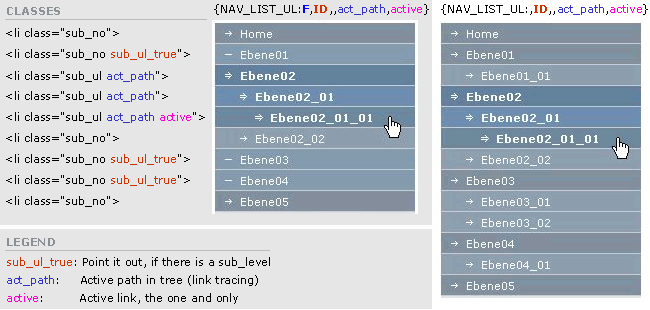
Knut

Re: NAV_TABLE_COLUMN submenu align
Posted: Tue 11. Nov 2008, 23:41
by blanders
Hmm. something is very wrong?
I don't figure it out, tried all combinations (while feeling like a blind man constructing a bomb).
I guess something is missing from my myNavi.
Re: NAV_TABLE_COLUMN submenu align
Posted: Wed 12. Nov 2008, 00:01
by Jensensen
blanders wrote:...a bomb...
please don't drop it here | don't let it go off!

too many of them already exploded during last weeks | months...
blanders wrote:...I guess something is missing from my myNavi...
But what?
Re: NAV_TABLE_COLUMN submenu align
Posted: Wed 12. Nov 2008, 00:30
by flip-flop
Please show me your {NAV_LIST_UL: - Tag }
Re: NAV_TABLE_COLUMN submenu align
Posted: Wed 12. Nov 2008, 00:58
by Jensensen
flip-flop wrote:Please show me your {NAV_LIST_UL: - Tag }


For all newbies:
SHOW ME YOUR NAV!
Take care! This is what you have to answer BEFORE entering this board!
@blanders: if i had IE, i would try to help. but now it's up to flip-flop...
Re: NAV_TABLE_COLUMN submenu align
Posted: Thu 13. Nov 2008, 09:22
by blanders
And here it goes: NAV_LIST_UL:F,1,act_path,active
I tried different tags though, this seem to work best for me.
Shall I add something into this?
Re: NAV_TABLE_COLUMN submenu align
Posted: Thu 13. Nov 2008, 09:31
by flip-flop
NAV_LIST_UL:F,1,act_path,active can´t work in a right way.
NAV_LIST_UL:F,1,,act_path,active
Re: NAV_TABLE_COLUMN submenu align
Posted: Thu 13. Nov 2008, 12:31
by blanders
It is now: NAV_LIST_UL:F,1,,act_path,active
And I use still:
#my_NAVI ul li.act_path a,
#my_NAVI ul li.act_path a:link,
#my_NAVI ul li.act_path a:visited,
#my_NAVI ul li.act_path a:active {
background:transparent url(/www2/img/article/nav_link_1_s.gif) no-repeat 0 0;
padding-left:15px;
But nothing changed..
Re: NAV_TABLE_COLUMN submenu align
Posted: Thu 13. Nov 2008, 13:12
by flip-flop
Please, please read the tut for this navigation. -
NAV_LIST_UL
act_path: Active path in tree (link tracing)
active: Active link, the one and only
#my_NAVI ul li.
active a,
#my_NAVI ul li.
active a:link,
#my_NAVI ul li.
active a:visited,
#my_NAVI ul li.
active a:active { ....
Re: NAV_TABLE_COLUMN submenu align
Posted: Thu 13. Nov 2008, 21:00
by blanders
I use: NAV_LIST_UL:F,1,,act_path,active
And this is:
#my_NAVI ul li.active a,
#my_NAVI ul li.active a:link,
#my_NAVI ul li.active a:visited,
#my_NAVI ul li.active a:active {
I use different image file for active link but still it shows different image file for active link PLUS sublinks.
I'm out of thoughts here..